I am not a scientist but this week I was testing the usage of an app. For the past couple weeks I have been designing a municipal app for Belmar New Jersey. Using the current website I decided what the important information was and what people would want and need at the touch of their fingers wherever they are.
Once figuring this out this information, I broke it down into categories. M thought process was, what would I consider this to go under.
I have nine main pages in the app.
What’s New :
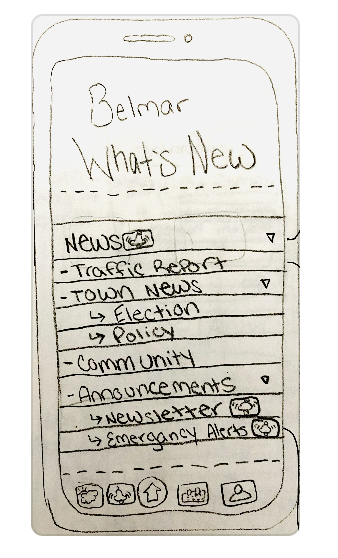
This is a section all about the news but I also broke that down event further. This section was broken down into traffic reports, town news, community news (More feel good stories), emergency alerts and a weekly newsletter.
When I look at the news sometimes its for a very specific purpose, thats why I broke up this section for easier naviatgtion.
How do I? :
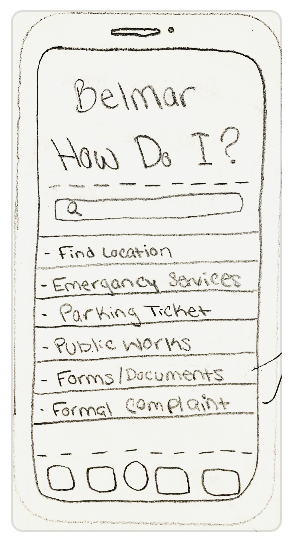
This section is a open secions that can be added to and changes with the user needs. It’s a tab that has more actionable tools, such as paying a parking ticket and finding an important city form or document. This section also has a search option if the tabs are not clear enough.
Events:
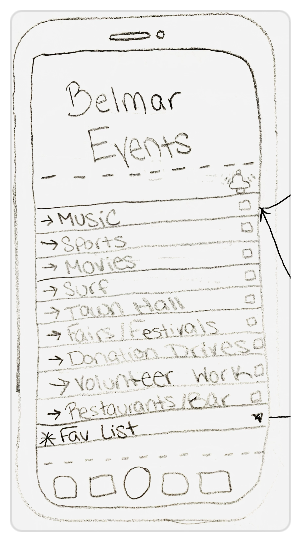
This is the one stop shop for events going on around the town, from music concerts to beach movies and even volunteer opportunities. This sections gives the user the ability to buy tickets, get directions, find parking and set notifications for the users to stay updated on any new events they might be interested in.
Job Postings:

This sections are to help local businesses and residents alike. A personal indeed page for this town of small businesses. This section has the ability to find jobs in specific fields, apply to these jobs and the check your application status. This will be super helpful for building a strong local community.
Beach:
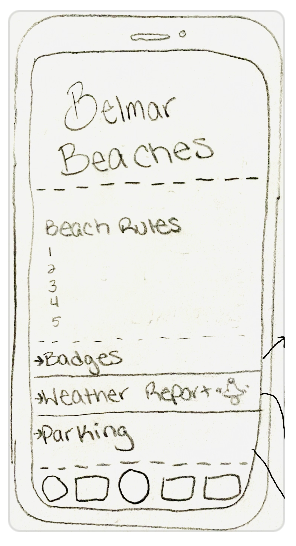
Any Beach information will be in this tab. From beach rules to where to buy badges to the wave report all in one. This will be great in the summer months for locals and visitors. This also helps promote the local parking app that helps keep the towns streets organized and safe.
Art & Rec:
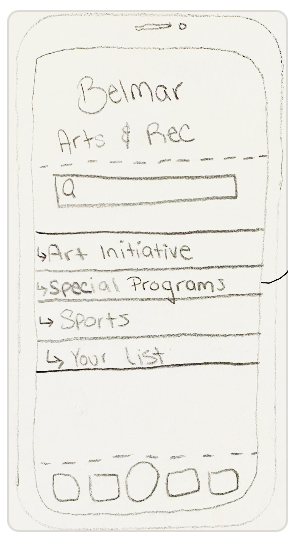
This Sections for me was the sign up screen for public art and cooking classes along with recreation sports for kids. A little way to grow the community and give the youth a place to go outside of school. This sections has the ability to registrar anf pay for a sport or class and add to a calendar so that you never miss a practice.
Transit:
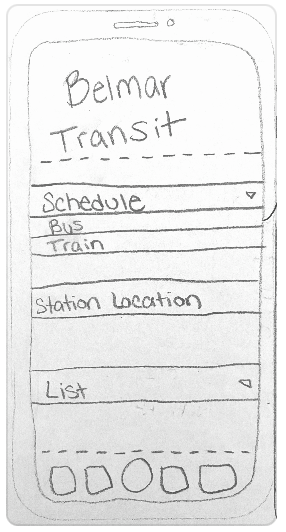
This is a commuter town, in and out of New York City and other places throughout New Jersey. This sections helps you find where to catch a bus or train and the ability to buy tickets.
Shops & Restaurants:
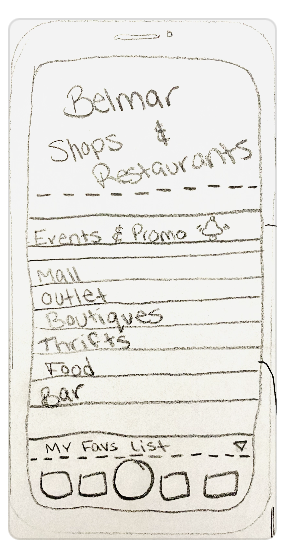
This sections is all local shops and restaurants. This is a way to help promote local businesses events and promos to really grow the economy. You can also set up notifications for new events posts to always stay updated on local stuff. This section also helps find restaurants and get directions to the location.
Resident:
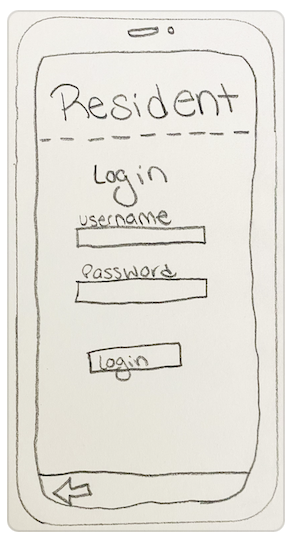
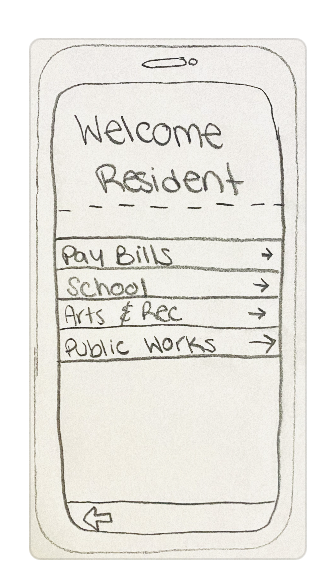
This is a login in tab for resident so they can pay their bills and check out information on their kids schools. This will need a login for protection of information but as a resident the user can do all this on their phone at work instead of on a computer.
With all that being said it was time to test out this information. I had two test subjects try the app and this allowed me to learn what worked and what didn’t work.
Test #1
Steve:
Tasks:
- Sign up and Schedule your kid for junior tennis and Add to calendar.
- Find a local italian restaurant and find parking
- Find a Job Posting and check your recently applied applications
- Check the news
What I learned:
- The Home Page tabs are pretty straight forward except the residents tab and maybe the ‘How Do I,” tab.
- The registration tab should be more thought out.
- When adding to calendar have a added pop up so that people are aware.
- Make sure the parking links to the app page and it doesn’t take the user to the beach tab.
- Make an Application tab for job application
- Make the “Applied to” more prominent.
- Getting back to the home page has been pretty user friendly. But it takes time, maybe making it more accessible on the further tabs.
What I need to Improve:
- Create a central button on every tab that allows users to go directly back to the home page.
- The adding to calendar should not take you out of the tab already in, maybe just have a pop up saying it has been added.
- Add in color to make important buttons stand out more.
Test #2
Alex
Tasks
- Sign up and Schedule your kid for junior tennis and Add to calendar.
- Find a local italian restaurant and find parking
- Make a formal complaint to the city
- Find the local beach weather report
- Check the bus schedule and add ticket to calendar
- Tickets to Demi Lovato Concerts
What I learned:
- Brings up news and events, this is important
- Beach is confusing
- The “How Do I,” section is confusing on what is under it.
- Bottom Buttons are not clear enough
- The search bar is helpful
- Make the home screen button easier to find
- Signing Up for sports works
- Formal Complaint was not under the first place that was looked at
- Finding the beach weather report was easy but understanding it was a little all over the place. Make this clear and visual.
- The bus tab was easy to find but the schedule was hard to read. (Review other bus schedules)
- Maybe a place to see purchases or a wallet might be assisted.
What I need to Improve:
- Reconsider the beach section and what is under it
- Reconsider the “How Do I” Section name and how to make the tasks under is more clear.
- Activate the search bar tab
- Fix the bus schedule
- Add a section similar to an apple wallet
- make images more clear
Overall conclusion:
What I have concluded is there my interpretation of things isn’t always the right way. I need to go back to the drawing boards for fix a few sections and to help the user glide through the app easier. Over all the app needs more clarity. It’s like spring cleaning, anything that doesn’t work or isn’t really needed might need to get tossed out of replaced with something better.
 Levy It All To Me